- My Experience Trading on BingX P2P: Complete Review
- BingX P2P Initial Trade Attempts and Onboarding
- Verification Process on BingX P2P
- Overall Observation from my Trading Experience on BingX P2P
- My Experience Using BingX P2P for Three USDT Trades (Participant 2)
- Trade 1: Difficulty Adding Bank Account and Delayed Payment
- Trade 2: A Longer Delay and a Slight Rate Difference
- Trade 3: Multiple Cancellations Before a Successful Match
- Overall Observation of my USDT Trading Experience on BingX P2P
- Get the Full Report: The State of Crypto P2P in Nigeria
For our November 2025 P2P study at Breet, we asked four users to trade on BingX P2P and document every step. Here are the experiences shared by two of the participants
My Experience Trading on BingX P2P: Complete Review
Hi, my name is Tochi, and I participated in Breet’s P2P research by completing several trades on the BingX P2P marketplace. Below is a summary of my experience across the transactions I carried out.
Related:
- Noones P2P Review: My Honest Experience Trading on the Platform
BingX P2P Initial Trade Attempts and Onboarding
During my first attempt, I explored the platform to understand how the process worked. I noticed that some buyers set specific price ranges for the amounts they want customers to sell.
This wasn’t very visible at the beginning, so I initially thought the trade wasn’t going through because of an error and logged out and back in again.
I also couldn’t complete the first trade until I had set my Funds Password and enabled Google Authenticator. Phone SMS verification didn’t work for me, it repeatedly displayed the message “I was too fast.”
BingX requires several authentication steps during trading. To make my first sale, I had to set up:
- A Funds Password
- Authenticator App
- Email code
- Phone SMS (which did not work for me)
To release USDT to a seller, I also had to complete three steps:
- Enter my Funds Password
- Use the Authenticator App code
- Request and input an Email code
There is a time frame for traders to make payment. Once the money arrived, I could instantly see their confirmation message.
Verification Process on BingX P2P
Before trading, I completed KYC by uploading a photo of my passport and taking a selfie. The entire verification process took roughly 2–5 minutes.
Understanding How Cancellations Work on BingX P2P
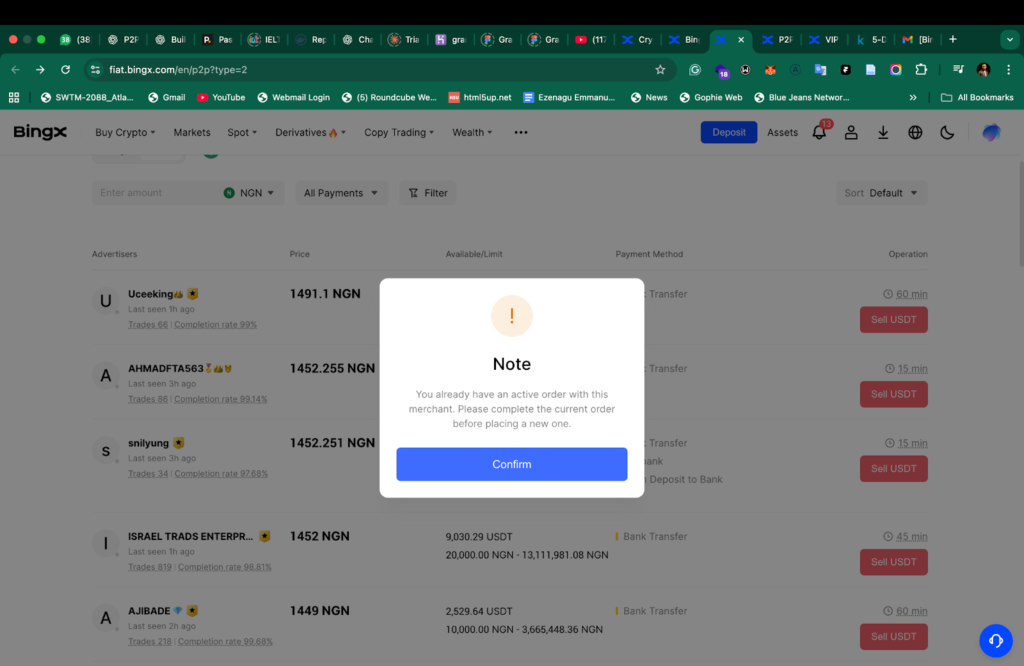
I attempted a trade around 3 a.m., but it was cancelled. The trader was shown as online earlier in the day, but the cancellation happened once the trader’s specified window elapsed.
If a trader sets their response or invoice time to 15 minutes, the app automatically closes the order once the 15 minutes pass without the trader submitting an invoice request.
That was how my early-morning trade ended. It took about ten minutes for the money to arrive in my bank account.
Related:
- KuCoin P2P in Nigeria: Review & Top 7 Alternatives
Second Trade on BingX P2p
For my next trade, the exchange process was fast and straightforward. I originally tried to complete it on the BingX mobile app but couldn’t find the P2P feature.
After searching through the app and not locating it, I looked up a YouTube tutorial and switched to the web version, where the feature was visible.
Once on the web platform, the trade went through without issues. It took about 5 minutes to receive the money.
Third Trade on BingX P2P
My third trade followed the same pattern as the second one. I used the web version again, and the exchange completed without any problems. Nothing went wrong in this transaction.
I also observed that I was not able to sell to a trader I had previously opened an order with earlier.
Overall Observation from my Trading Experience on BingX P2P
- The platform uses multiple authentication layers for selling and releasing assets.
- Some buyers have specific price ranges that determine whether your trade amount fits their criteria.
- Previous orders with a trader cannot be reopened for new transactions.
- Once payment is made, confirmation appears immediately.
- The in-app P2P feature was not available on the mobile app during my test.
- The time-based auto-cancellation worked according to the trader’s preset window.
- There was no rating scale for traders. Just a single golden badge to verify the trader/seller
My Experience Using BingX P2P for Three USDT Trades (Participant 2)
Hello, my name is Oiza and here’s my experience trading USDT on BingX P2P.
Verification Process
Before trading, I completed BingX’s verification requirements, which involved providing my BVN and taking a selfie. The entire KYC process was quick and took less than two minutes to complete.
Once verified, I proceeded to test the P2P marketplace across three different transactions.
Read Also:
- Crypto P2P in Nigeria: Risks & Why OTC is Better For You
Trade 1: Difficulty Adding Bank Account and Delayed Payment
For my first trade, the main challenge was at the setup stage. I experienced difficulty adding my bank account details to receive payment.
It took several attempts before the platform finally accepted the information, and this slowed down the initial part of the transaction.
After placing an order, the payout I received matched the exact rate displayed at the beginning of the trade, with no differences between the listed and actual amount.
Payment Delay
The vendor eventually made the payment, but it took about 20 minutes before the funds reflected in my account.
During this period, the order remained active, and I had to keep checking my banking app to confirm the transfer. Once the payment finally arrived, the rest of the process, (confirming receipt and releasing the USDT) was straightforward.
Trade 2: A Longer Delay and a Slight Rate Difference
The second trade followed a similar pattern but involved an even longer wait time. After matching with a vendor and confirming the order:
1. Extended Payment Timeline
It took about 25 minutes to receive the funds. This was significantly longer than typical P2P transfers, and the waiting period made the transaction feel slower.
2. Amount Received Was Slightly Less
I noticed a small discrepancy in the payout. The amount sent to me was 0.015 less than what was shown on the order summary. While the difference wasn’t large, it did create a mismatch between the expected and actual amount received.
Other than these two points, the process itself did not encounter any system errors. Once the funds arrived, I was able to complete the trade normally.
Trade 3: Multiple Cancellations Before a Successful Match
The third transaction was different from the first two because of repeated cancellations.
1. Vendors Cancelled Before Paying
I opened several orders, but three different vendors cancelled before making payment. Each cancellation occurred because the vendor did not complete the transfer within the time limit assigned to the order. BingX automatically closed these trades once the countdown expired.
2. Successful Vendor With Fast Payment
After several attempts, I found a vendor who completed the payment extremely quickly. The time from order placement to payout was about one minute, making it the fastest of all three transactions.
Once the payment reflected, I confirmed receipt and released the USDT without any issues. There were no discrepancies in the payout, and the rate matched what was shown when the trade began.
Don’t Miss:
- Does Binance Work in Nigeria? (2025 Update)
Overall Observation of my USDT Trading Experience on BingX P2P
Across all three trades, the BingX P2P experience varied:
- Verification was very fast and took under two minutes.
- Transaction 1 involved challenges adding bank details and a 20-minute wait for payment.
- Transaction 2 took longer (25 minutes) with a slight difference in the payout amount.
- Transaction 3 had multiple vendor cancellations but ended with one very fast-paying trader.
- Once payment arrived, confirming receipt and releasing USDT was easy to complete.
Get the Full Report: The State of Crypto P2P in Nigeria
- We deployed 30+ real people across 5 major platforms to conduct 100s of transactions and observe what P2P actually looks like in the real world.
- We scraped 31k+ tweets from 2022–2025, cleaned them to 20k, and analyzed sentiment, pain points, emotional patterns, and viral incidents.
We tested multiple BingX trades; delays, missing amounts, and one smooth transaction. See why BingX payouts ranged from “1 minute” to “25 minutes,” and what caused the differences.
Dive into the full BingX analysis.